
Events details
The system captures events such as Create PDP, Delete PDP, Low balance, and so on. All the events are arranged in descending order of their occurrence. The system captures the following events:
|
Event Name |
Technology |
Purpose |
|
Alert Service Centre |
2G/3G |
Notifies the SMSC that the mobile is reachable again, prompting delivery of pending SMS messages. |
|
Authentication Failure Report |
4G |
Sent by MME to HSS to report failed authentication attempts, often used for security monitoring. |
|
Authentication-Information-Request |
4G |
MME requests authentication vectors from HSS to authenticate the UE. |
|
Cancel Location |
2G/3G |
HLR instructs VLR to remove subscriber data due to location change, SIM removal, or network reset. |
|
Cancel-Location-Request 4G |
4G |
MME requests HSS to remove UE context, typically during detach or handover to another MME. |
|
Create PDP |
4G/3G |
Establishes a data session by creating a PDP context, assigning IP address and QoS parameters. |
|
Delete PDP |
4G/3G |
Terminates a data session and releases associated resources such as IP address and bearer. |
|
Delete Subscriber Data |
4G |
Removes subscriber profile from MME or HSS, often triggered by SIM deactivation or admin action. |
|
Delete-Subscriber-Data-Request 4G |
4G |
Diameter message from HSS to MME to delete subscriber data, typically during provisioning cleanup. |
|
Insert Subscriber Data |
4G |
HSS sends updated subscriber profile (e.g., APNs, QoS, restrictions) to MME. |
|
Insert-Subscriber-Data-Request 4G |
4G |
Diameter message used to push subscriber data from HSS to MME, often after profile updates. |
|
Low Balance |
2G/3G/4G |
Charging system (OCS) notifies network that the subscriber has insufficient credit for services. |
|
MAP Reset |
2G/3G |
Resets MAP signaling connections between network nodes (e.g., HLR ↔ VLR) to recover from errors. |
|
Mobile Initiated USSD |
2G/3G |
UE sends a USSD message (e.g., balance check, service activation) to the network. |
|
Network Initiated USSD |
2G/3G |
Network sends a USSD message to the UE (e.g., promotional messages, service alerts). |
|
Notify-Request |
4G |
HSS informs MME of changes in subscriber profile, such as new APNs or service restrictions. |
|
Provide Subscriber Info |
2G/3G |
Network requests subscriber details (e.g., IMSI, MSISDN, service profile) from HLR. |
|
Purge Mobile Subscriber |
4G |
MME requests HSS to purge subscriber data due to attach failure, session timeout, or UE unreachable. |
|
Purge-UE-Request 4G |
4G |
External systems (e.g., SIM management platforms) request MME/HSS to clean up UE context forcibly. |
|
Ready for Short Message |
2G/3G |
VLR informs SMSC that the UE is now reachable and ready to receive SMS messages. |
|
Report Short Message Delivery Status |
2G/3G |
MSC/VLR reports SMS delivery success or failure back to SMSC. |
|
Reset-Request |
4G |
Resets signaling interfaces (e.g., S6a, S1) between network nodes to recover from faults. |
|
Send Authentication Info |
2G/3G |
HLR provides authentication triplets to MSC/VLR for GSM authentication. |
|
Send Routing Info for Short Message |
2G/3G |
HLR provides routing info (e.g., MSC address) for SMS delivery to the subscriber. |
|
SMS-MO |
2G/3G/4G |
Mobile-Originated SMS sent by UE to the network for delivery to another user. |
|
SMS-MT |
2G/3G/4G |
Mobile-Terminated SMS sent by SMSC to the UE. |
|
Update Location GPRS |
3G |
SGSN updates subscriber location in packet-switched domain and retrieves profile from HLR. |
|
Update Location GSM |
2G |
MSC/VLR updates subscriber location in circuit-switched domain and retrieves profile from HLR. |
|
Update Location Request 4G |
4G |
MME updates UE location in HSS and retrieves subscriber profile for LTE services. |
-
After clicking Detailed View, by default, the Events tab is displayed. Refer to the following screen
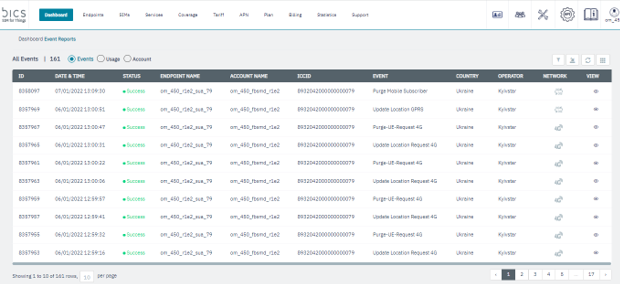
The following event details are displayed on the screen.
|
Field |
Description |
|---|---|
|
ID |
Indicates the unique Event ID |
|
Date and Time |
Indicates the date and time when the event took place. Time is displayed in Account Time-Zone |
|
Status |
Indicates the status of the Event. |
|
Endpoint Name |
Indicates the name of the Endpoint from where the event originated |
|
Account Name |
Indicates the name of the enterprise |
|
ICCID |
ICCID indicates the serial number of the SIM. ICCID is a unique reference number given for each SIM |
|
Event |
Indicates the type of event recorded from each endpoint. |
|
Country |
Indicates the originating country of the event |
|
Operator |
Indicates the operator from which the event originated |
|
Network |
Indicates the network type of the transaction. For example, 2G, 3G, 4G, or NBIOT |
|
View |
Click to view the short description of the event (see below for more information).
|
On the Events screen, place the cursor over the
icon to view the quick description of the event. Refer to the following screen.
The following event details are displayed on the screen.
|
Field |
Description |
|---|---|
|
The Event status is displayed on the top. |
|
|
IMSI |
Indicates the IMSI of the endpoint.
|
|
MSISDN |
Indicates the MSISDN of the endpoint |
|
GT |
Indicates the unique address for routing signaling messages on telecommunications networks |
|
Realm |
Indicates the security policy domain for the web application server. |
|
IMEI |
Indicates the IMEI of the device used |
If the event results in failure, the following screen is displayed.
The following event details are displayed on the screen.
|
Field |
Description |
|---|---|
|
Error Code |
Indicates the unique error code for the event failure. |
|
Error description |
Indicates the error description for the event |
|
IMSI |
Indicates the IMSI of the endpoint.
|
|
MSISDN |
Indicates the MSISDN of the endpoint |
|
GT |
Indicates the unique address for routing signalling messages on telecommunications networks. |
|
Realm |
Indicates the security policy domain for the web application server. |
|
IMEI |
Indicates the IMEI of the device used |