
View service profile
1. On the top menu, click Services to view the Service details. Refer to the following screen.
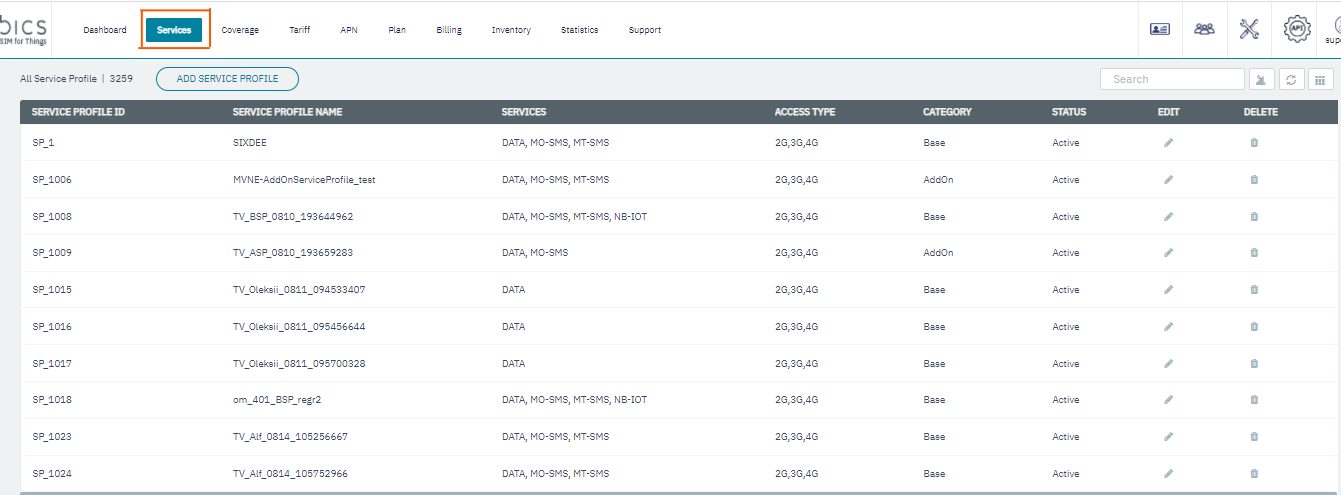
The following service details are displayed on the screen.
|
Field |
Description |
|---|---|
|
Service Profile ID |
Indicates the unique reference ID of the Service Profile |
|
Service Profile name |
Indicates the name of the Service Profile |
|
Services |
Indicates the type of service provided by the Service Profile. For example MT-SMS, MO-SMS, Data or NB-IOT |
|
Access Type |
Indicates the network type. For example 2G, 3G, 4G.. |
|
Edit |
Click to edit the Service Profile details (see below for more details).
|
|
Delete |
Click to delete the Service Profile (see below for more details).
|
|
Note: By default, the below columns are not displayed. You can view the below columns using the show/hide columns ( ) button
|
|
|
Network type |
Indicates the network type of the Service Profile. For example, GSM |
|
Service Category |
Indicates the Service category of the Service Profile. For example Base or Addon |
|
Basic Service |
Indicates the Basic Service available for the Service Profile. For example, SMS, Data and NB-IOT |
|
Status |
Indicates the status of the service profile. For example, Active or Inactive. |