
Value added features
1. On the top menu, click
to view the settings menu.

2. On the Configuration screen, click the Value added feature. Refer to the following screen.

3. The following value added feature details are displayed on the screen.
-
By default, value added features will be sorted based on ascending order of Value added feature ID.
-
Sorting of the table can be performed on click on each column name and sorting will happen on the complete table.
-
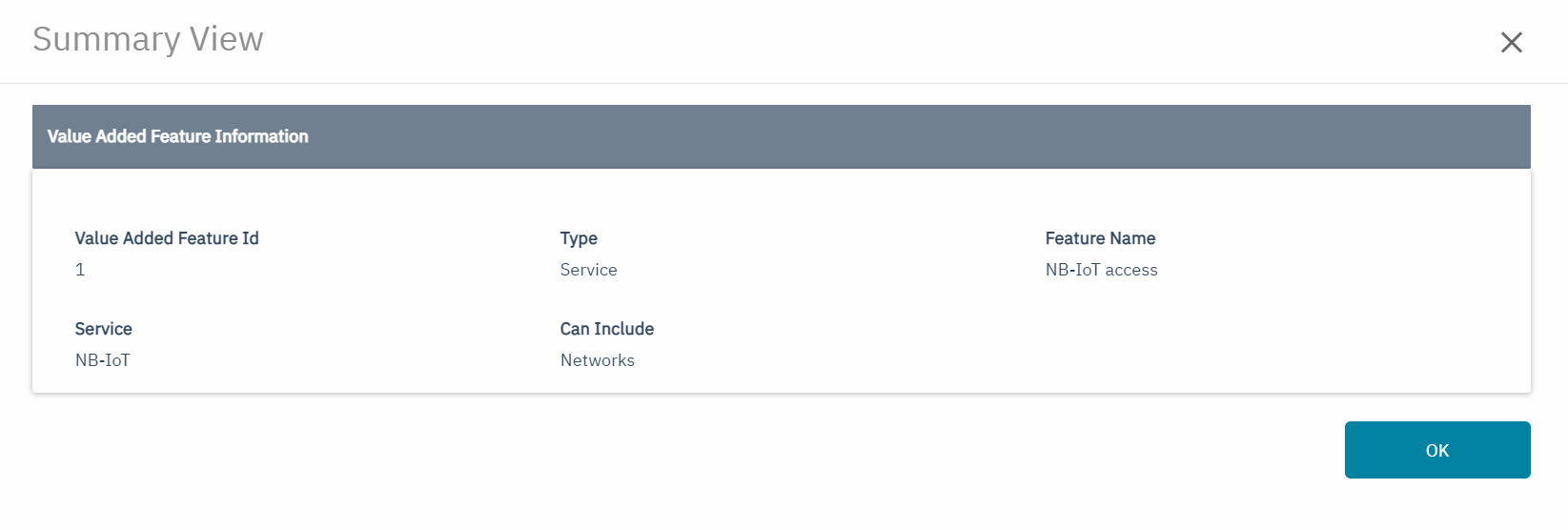
On click of view icon on the main page, the summary view screen will be loaded with the details of Value added feature, Refer to the following screen.
-
The following value added feature details are displayed on the summary view page.
|
Field |
Description |
|---|---|
|
Value added feature Id |
System-assigned Id of the value added feature |
|
Type |
Specifies whether the configured value is a feature or a service |
|
Feature Name |
Refers to the name of the value added feature |
|
Service |
Service the value added feature refers to, visible only for the value added feature type = 'Service' |
|
Can Include |
Coverage units that can be included in the “feature based SIM management” fee, visible only for the value added feature type = 'Service' |
|
View |
On click of view icon, the summary view of the value added feature details will be shown |
SFT – Feature based SIM management fee – This charge is shown when Feature based SIM management fee is selected as Category as part of Charges section. This fee will be charged based on SIM provisioning and networks usage, and on top of the normal SIM management fee.
In order to show Features under the Feature Based SIM management Fee, Features need to be created First in the Value Based Feature section under Settings
Select Add Value Added Feature option to create a new Feature

2 Types of Value added Features can be created.
· Service
· Feature

Service is used when you want to apply a SIM management fee based on network usage for
You can select a SIM fee corresponding to Data service or NB-IOT service.
Value added feature : Service
Service(NB IoT/Data) must be selected as SIM management fee will be charged based on Data or NB-IoT usage. Networks must always be selected.
Example:

Feature is when you want to apply the fee based on a feature used by the SIM. The feature and the SIM are not linked
Value Added Feature: Feature
Only Feature Name is required
Example:

All the created Features will be shown Under the Feature Based Management as below
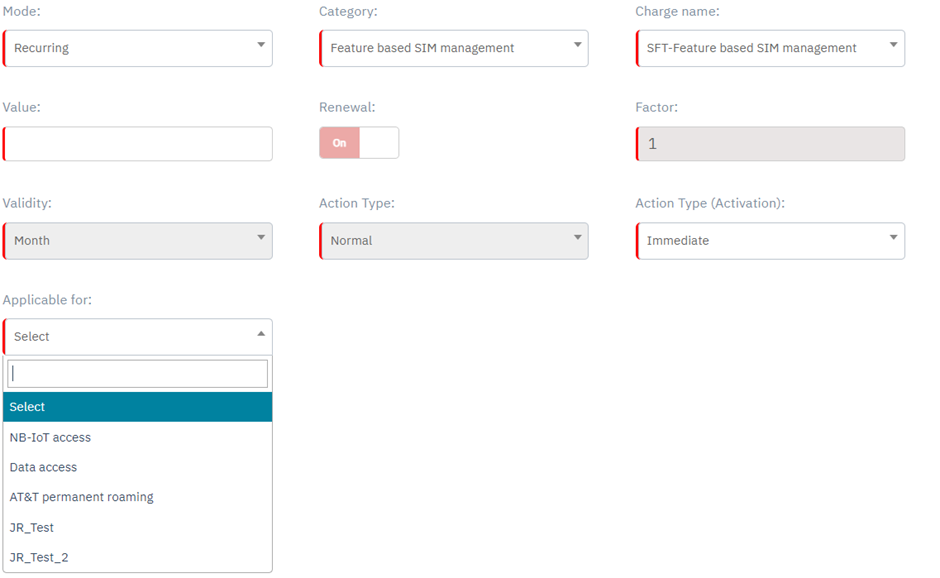
Plan Configuration:
Feature Based SIM Management is configured under the Charges of a plan
When a Feature is selected in the “Applicable for” Drop down, Limited fields will be shown. Please see below.
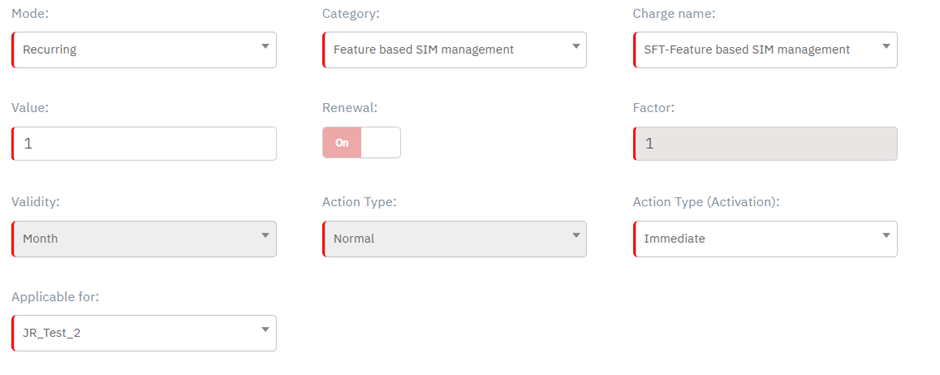
When a Service is selected in the “Applicable for” Drop down, then additional fields will be shown after “Applicable for” drop down. Please see below.
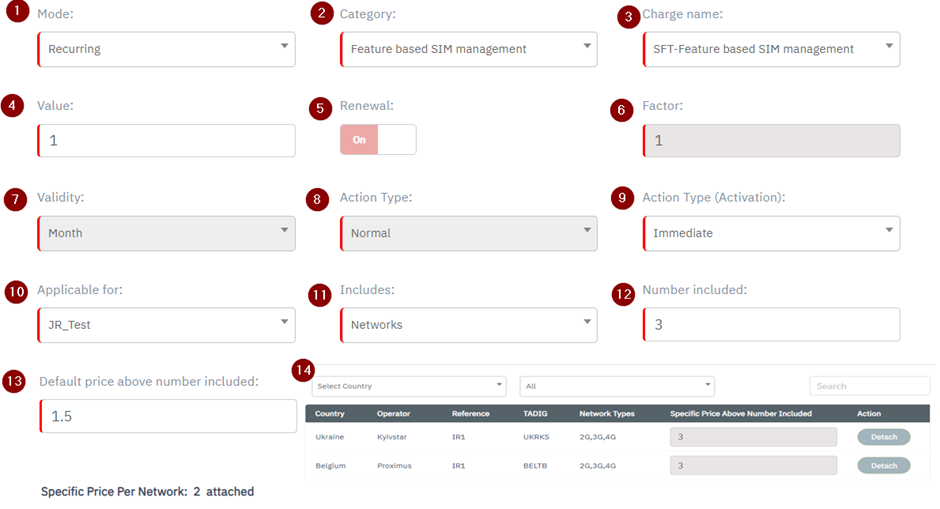
Detailed description :
|
1 |
Mode |
Select the Charge mode from the drop-down list as Recurring.
|
|
2 |
Category |
|
|
3 |
Charge Name |
|
|
4 |
Value |
Feature based SIM management as Action type.
|
|
5 |
Renewal |
Renewal is always ON and not editable
|
|
6 |
Factor |
factor value is always 1 and not editable |
|
7 |
Validity |
Validity is always Monthly and not editable |
|
8 |
Action Type |
Action Type default selected not editable.
|
|
9 |
Action Type (Activation) |
|
|
10 |
Applicable for |
Shows the List of Features created under Value Added Features section. Only 1 Feature should be selected from the list of features. |
|
11 |
Includes |
By default, this field is not displayed. This field is displayed only when Service related feature is selected in “Applicable For” Drop down.
|
|
12 |
Number included |
By default, this field is not displayed. This field is displayed only when Service related feature is selected in “Applicable For” Drop down.
|
|
13 |
Default price above number included |
By default, this field is not displayed. This field is displayed only when Service related feature is selected in “Applicable For” Drop down.
|
|
14 |
Specific price per network |
By default, this field is not displayed. This field is displayed only when Service related feature is selected in “Applicable For” Drop down. contain one line per network .
|
|
|
|
|
When defining a Feature based SIM management below are the following option
-
Define a SIM management fee for using the specific service (data or NB-IoT) on a certain number of networks
-
Define a SIM management fee that will be applied on top of the initial fee, when using the specific service on more networks
-
Define a SIM management fee that will be applied on top of the initial fee, when using the specific service on specific networks
Example 1
Customer has created a value-added feature called “JR_Test” for NB-IoT service
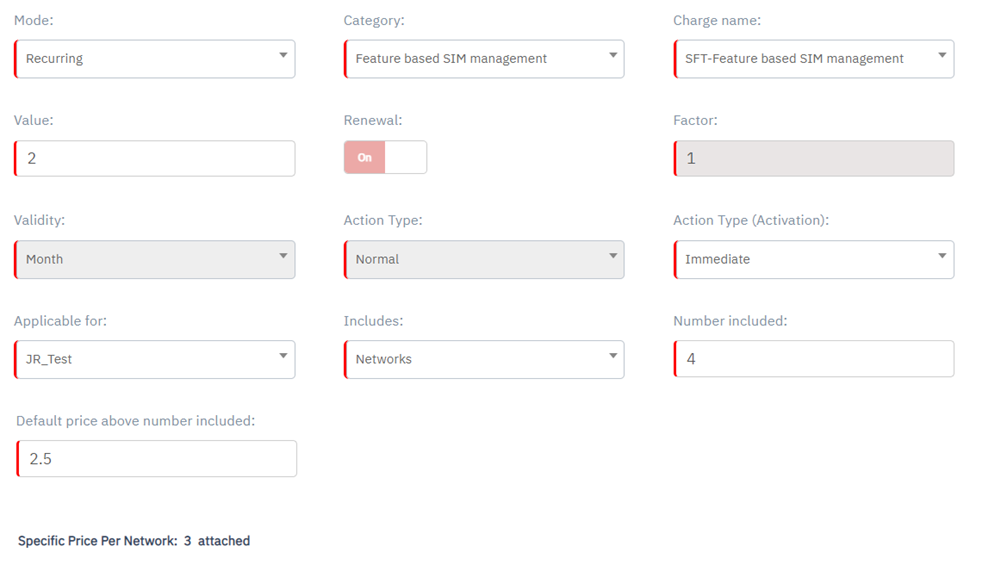
In the plan there is the following configuration, based on which
-
Every SIM will be charged for 2 Euro as SIM management fee for using NB-IoT service in up to 4 Networks.
-
If SIM uses more than 4 networks, it will be charged an additional 2.5 euro for each additional network
-
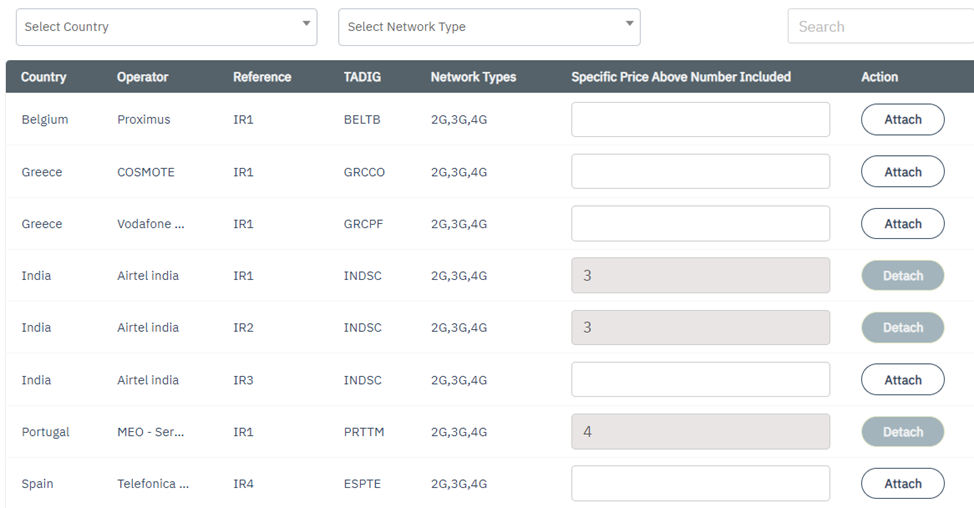
On top of that, when SIM uses data service on specific networks, it will pay as following
-
3 euro for using Airtel India IR1
-
3 euro for using Airtel India IR2
-
4 euro for using Portugal MEO
-
This price will not be charged if any of these networks is used before exceeding the 4 networks but it will override the above price of 2.5 Euro
Understanding Multiple SIM Management Fees and How charging is applied
Please refer below to understand how charging is applied when Multiple SIM Management fees are present
Understanding Multiple SIM Based Fees and How charging is applied